How to Backup your Iphone

By default your iPhone will automatically sync and create a backup each time your iPhone is connected to

How to Remove Facebook Timeline

So now you have reached here searching for how to remove this timeline feature . I’m not surprised because many of

How to improve Your mobile phone Signal

Wait, I can't hear you" is more than a smarmy catchphrase. It's also the enraged anthem of anyone

How to chat with your friends using command prompt

If you want to chat with your friends, you just have to know one thing, which is your friend's system's

How to Access Blocked Social Websites

The scenario has changed a lot over the past decade.Internet has grown into a vast resource and with

Tuesday, 21 August 2012

How to install Internet Usage Meter in your PC

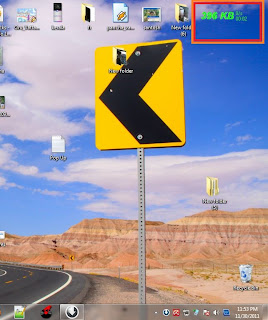
May you have faced the additional billing problems, your operator cheat you and charged you extra....but now no need to worry you can calculate the exact amount that you have used and nobody can cheat you.....all you have to do is to install internet usage meter to your PC.....

Just go through the below steps :-

1.First Download Internet Usage Meter

2.Click Install

3.Select Ur Network Connection From The List


4.Click Ok


5.Now u have installed the Internet Usage Meter


It will be showing the Reading on Right Top of ur DeskTop


How to Make Your Computer Speak When you Log On

Make your computer speak on startup and amaze your friends,its a very simple trick.....just go through the below article....
 
1.open Notepad

http://www.pcandtech.com/wp-content/uploads/2012/08/computer-will-talk-to-you-and-welcome-you.jpg2.Paste the bellow code in Np


Dim speaks, speech
speaks="Welcome Back, Username"
Set speech=CreateObject("sapi.spvoice")
speech.Speak speaks


3.Replace Username with your Name
4.Click Save As and save as type Welcome.vbs
5.Copy File Welcome.vbs and paste it in bellow address

                                                             Windows-7

C:\Users\Username\AppData\Roaming\Microsoft\Windows\Start Menu\Programs\Startup


6.*Replace Username with your username and C:\ with your Root Drive
 
                                                             Windows-Xp

C:\Documents and Settings\All Users\Start Menu\Programs\Startup


Done Log Off and Log In Amazed? .Now Your computer welcomes you with your name.....

How to get analysis report of your facebook friends


Your first step is :-  Goto facebookspectrum.com
Facebook Spectrum is a free online application utilizing Facebook APIs and social graph to provide you a birds eye view of all your friends on facebook. You will need to be logged in to Facebook to access this application.
In the timeline section, we see all the status updates and Wall talks, both our own and any of our friends. This part is mainly intended to discover in a moment or suspicious activity that went unnoticed.
A useful section is that of the birthday, which shows a calendar with birthdays all highlighted, and a list of who and how many meet each month. With Geolocation, we can see in Google Maps the location of all our friends, no matter what city or area they are in.
A very good section devoted to photos, which you may know who has a large number of albums and photos, plus easy access to viewing the albums of any friend by creating a pie chart showing the top 10 of your friends with the most number of album.
Finally, we know what gender, male or female or other, is prevalent among our community, and to discover what things we like mutually among our friends. 

How to copy files via infrared port


You just have to open cmd and type this command
irftp filename.ext
This will fire up the Wireless Link dialog so that you can copy the specified file via an infrared port.
ENJOY :)

How to kill a program using cmd


You just have to type this command in cmd
taskkill /im programname.exe /f

If, when using the tasklist command, you discover that there is something running you just want killed. This is the way to do it! Just note the program name and use it in place of programname.exe.

How to retrieve detailed system information


You just have to open cmd and type this command
systeminfo
With this command, you can retrieve the following information:
  • Host Name
  • OS Name
  • OS Version
  • OS Manufacturer
  • OS Configuration
  • OS Build Type
  • Registered Owner
  • Registered Organization
  • Product ID
  • Original Install Date
  • System Up Time
  • System Manufacturer
  • System Model
  • System type
  • Processor(s)
  • BIOS Version
  • Windows Directory
  • System Directory
  • Boot Device
  • System Locale
  • Input Locale
  • Time Zone
  • Total Physical Memory
  • Available Physical Memory
  • Virtual Memory Max Size
  • Virtual Memory Available
  • Virtual Memory In Use
  • Page File Location(s)
  • Domain
  • Logon Server
  • Hotfix(s)
  • NetWork Card(s)

How to monitor port activity via cmd

You just have to open cmd and write this command
netstat -a 30

This will show you all of the TCP/IP ports that are being used on your system and what they are connecting to (or being connected from). It will continue to monitor these ports and refresh the information every 30 seconds. You can change the refresh rate by changing the number at the end of the command.

How to find files which are opened by network users


You just have to type this command in cmd
openfiles /query

If you are running a system and you want to know who has files open on your computer, this command will provide you a list of those users and the files that they have open.
Note: If you get an error saying The system global flag ‘maintain objects list’ needs to be enabled to see local opened files, you can fix this issue by typing openfiles /local on. You will have to reboot the system but it will resolve the issue.

How to get information about IP address


You just have to write this command in cmd
ipconfig /all

This will retrieve a pile of information about your network connection and IP information. From this command, you can get:
  • Host Name
  • Primary DNS Suffix
  • Node Type
  • IP Routing Enabled
  • WINS Proxy Enabled
  • DNS Suffix Search List
  • Connection-specific DNS Suffix
  • Network Adapter Description
  • Physical (MAC) Address
  • DHCP Enabled
  • IP Address
  • Subnet Mask
  • Default Gateway
  • DNS Servers

How to change the registered owner in windows 7

If you’ve ever wondered how to change the name of the person that Windows is registered to, this is the quick tip for you. It’s not all that useful, but it might come in handy if you got a computer from somebody else.
In order to do this, you need to follow these steps given below:-

Step 1) Open up regedit.exe through the start menu search box, and then locate the following registry key:
HKEY_LOCAL_MACHINE\SOFTWARE\Microsoft\Windows NT\CurrentVersion

Now you can find the Registered Owner and Registered Organization keys in the right-hand pane. Change them to whatever values you want.
This is it ENJOY  :)